Expander and split pane
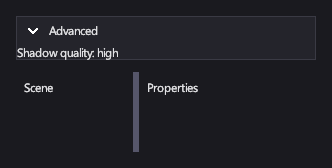
An Expander shows or hides its content under a header, for optional detail such as advanced settings. A SplitPane divides its space between two panes with a divider the player drags, as in an editor layout.
Markup
<!-- Expander shows or hides its content under a header; SplitPane divides space between two panes. -->
<StackPanel Orientation="Vertical" Width="300">
  <Expander Header="Advanced" IsExpanded="True" Margin="0,0,0,12">
    <TextBlock>Shadow quality: high</TextBlock>
  </Expander>
  <SplitPane Orientation="Horizontal" SplitterPosition="0.4" Height="80">
    <SplitPane.First>
      <TextBlock Margin="8">Scene</TextBlock>
    </SplitPane.First>
    <SplitPane.Second>
      <TextBlock Margin="8">Properties</TextBlock>
    </SplitPane.Second>
  </SplitPane>
</StackPanel>
The expander's content is its child element. The split pane's two panes are property elements, SplitPane.First and
SplitPane.Second.
Key properties
| Property | Description |
|---|---|
| Header | The header: text or any element. |
| IsExpanded | Whether the content shows. |
| First / Second | The two panes. |
| Orientation | Horizontal puts the panes side by side; Vertical stacks them. |
| SplitterPosition | Where the divider sits, from 0 to 1. |
| MinFirstSize / MinSecondSize | How small each pane can get. |
Events and commands
IsExpandedChanged and SplitterPositionChanged.
Styling
The expander's template has a header part, PART_Header (an ExpanderHeader), with the visual states Hovered,
Pressed, Focused and Checked (the chevron turns). The expander animates between its Expanded and Collapsed
states over 0.2 seconds. The split pane's divider is the PART_Divider part, with Hovered and Pressed states.
Keyboard, gamepad and touch
The expander's header is a toggle button: Enter or the gamepad's A button opens or closes it, and so does a click or tap. The split pane's divider follows a mouse drag or a finger.
Expander
Collapsed, it takes only its header's height.
SplitPane
The panes resize as the divider moves; each stays at least its minimum size.
See also
- Panels for fixed layouts.