Text
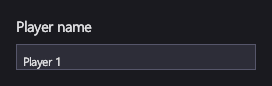
A TextBlock shows text: labels, titles, captions. A TextBox lets the player type a single line of text, such as a name or a seed.
Markup
<!-- TextBlock shows text; TextBox edits it. -->
<StackPanel Orientation="Vertical" Width="240">
  <TextBlock FontSize="20" Margin="0,0,0,8">Player name</TextBlock>
  <TextBox Text="{Binding PlayerName, Mode=TwoWay}" />
</StackPanel>
A text box's Text binds two-way by default, so what the player types goes back to the view model's PlayerName;
the snippet writes Mode=TwoWay out only to show it.
Key properties
| Property | Description |
|---|---|
| Text / Text | The text shown or edited. |
| FontFamily | The font family name. Without one, the configuration's default family is used (Segoe UI with the engine defaults). |
| FontSize | The size in pixels. |
| FontStyle | Regular, bold, italic. |
| Foreground | The text color. The default theme makes it light. |
Font properties aren't inherited: set them on each text element, or once for all of them with an implicit Style.
Events and commands
TextChanged fires on every edit. With a binding, you usually don't need it: the bound property changes instead.
When a text box is bound two-way to a number and the player types something that isn't one, the binding keeps the
old value and the text box shows the Invalid state (a red border in the default theme) until the text parses again.
Styling
The default theme gives TextBlock a light foreground, and TextBox a dark background with a border. A text box's
visual states are Focused, Invalid and FocusedInvalid.
When a font can't be found, the text falls back to the configuration's fallback font, and IcyUI logs a warning once for that family. See Fonts on other platforms.
Keyboard, gamepad and touch
A focused text box takes typed text. Left and Right move the caret, Home and End jump to either end, and Backspace and Delete erase. At either end of the text, Left and Right move focus to the next control instead, as Up and Down always do, so a gamepad can leave a text box with the D-pad. Typing past the right edge scrolls the text to keep the caret visible.
Note
Text selection (Shift+arrows, dragging) and the clipboard aren't supported yet.
TextBlock
Measures to its text: one line is as tall as the font's line height, so letters such as y and g aren't cut off.
TextBox
Single-line. It sizes to its text, or set Width for a fixed field.
See also
- Fonts on other platforms.
- Panels to line up labels and text boxes.