Dialogs and windows
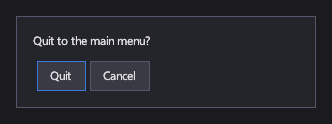
A Window is a framed panel that keeps keyboard and gamepad focus inside itself while it's open, for an in-game menu or an inventory. A Dialog is modal: it covers the screen with a dimmed backdrop, blocks the mouse and touch behind it, and closes with Escape or the gamepad's B button. MessageBox shows a ready-made dialog with a message and buttons, and returns the player's answer.
Markup
<!-- A Window traps keyboard and gamepad focus while open; Dialog and MessageBox are shown from code (see the page). -->
<Window Width="300">
  <StackPanel Orientation="Vertical" Padding="16">
    <TextBlock Margin="0,0,0,12">Quit to the main menu?</TextBlock>
    <StackPanel Orientation="Horizontal">
      <Button Margin="0,0,8,0" Command="{Binding QuitCommand}">Quit</Button>
      <Button>Cancel</Button>
    </StackPanel>
  </StackPanel>
</Window>
A window is added to the canvas like any element and drawn only while open: call Show() to open it and Close() to
close it.
For a question with a standard answer, use a message box from code:
public static async Task<bool> ConfirmQuitAsync(Canvas canvas)
{
    // Shows a modal message over the canvas and waits for the player's choice; Escape closes it with DialogResult.None.
    DialogResult result = await MessageBox.ShowAsync(canvas, "Quit to the main menu?", DialogButtons.OKCancel);
    return result == DialogResult.OK;
}
Key properties
| Property | Description |
|---|---|
| IsOpen | Whether the window is open. |
| Content | What the window or dialog shows. |
Events and commands
Opened and Closed for a window;
Closed for a dialog. Dialog<TResult> adds a result: its ShowAsync
returns a task that completes with the value the dialog closed with.
Styling
The default theme gives windows a dark background and a border. A dialog's template draws the backdrop and centers its content box.
Keyboard, gamepad and touch
While a window or dialog is open, Tab, the arrow keys and the D-pad move focus only among its controls, and focus
returns to where it was when it closes. Escape or B closes a dialog or message box (a message box then returns
DialogResult.None).
Note
A window doesn't block the mouse or touch: controls behind it stay clickable. Use a dialog when nothing else may be used until the player answers.
Window
Not modal for the pointer; modal for focus.
Dialog
Shown with Show(canvas) as an overlay above everything on the canvas.
MessageBox
ShowAsync(canvas, message, buttons) with DialogButtons.OK, OKCancel, YesNo or YesNoCancel; and
ShowInputAsync(canvas, prompt) for a line of text.
See also
- Buttons for a dialog's actions.