Scrolling
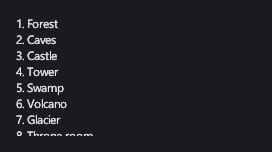
A ScrollViewer shows content larger than itself and scrolls it: a long list, a credits screen, a codex page.
Markup
<!-- ScrollViewer scrolls content larger than itself. -->
<ScrollViewer Width="240" Height="120">
  <StackPanel Orientation="Vertical">
    <TextBlock>1. Forest</TextBlock>
    <TextBlock>2. Caves</TextBlock>
    <TextBlock>3. Castle</TextBlock>
    <TextBlock>4. Tower</TextBlock>
    <TextBlock>5. Swamp</TextBlock>
    <TextBlock>6. Volcano</TextBlock>
    <TextBlock>7. Glacier</TextBlock>
    <TextBlock>8. Throne room</TextBlock>
  </StackPanel>
</ScrollViewer>
Give the scroll viewer a size (or put it where its parent limits it); its content can then be as tall as it needs.
Key properties
| Property | Description |
|---|---|
| VerticalScrollMode / HorizontalScrollMode | Whether it scrolls along each axis. |
| VerticalOffset / HorizontalOffset | The scroll position. |
| PanningMode | Which axes pan with touch and the middle mouse button. |
Events and commands
ScrollChanged fires when the position changes.
Styling
The default theme draws no frame; set BorderThickness and BorderBrush for one.
Keyboard, gamepad and touch
The mouse wheel scrolls. A finger, or the middle mouse button, drags the content, and a flick keeps it moving for a moment. Moving focus to an element out of view scrolls it into view.
Note
MonoGame's DesktopGL backend reports no touch input, so panning there works with the middle mouse button only.
ScrollViewer
With a list or grid of items inside, only the items in view are created, so even very long lists scroll smoothly.