Tree view
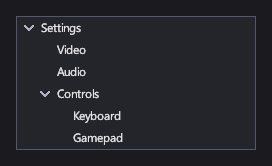
A TreeView shows nested items that the player expands and collapses: a settings tree, a quest log, a scene hierarchy in a level editor.
Markup
<!-- A static tree written in markup with TreeViewNode; bind ItemsSource for a tree built from your data. -->
<TreeView Width="240">
  <TreeViewNode Header="Settings" IsExpanded="True">
    <TreeViewNode Header="Video" />
    <TreeViewNode Header="Audio" />
    <TreeViewNode Header="Controls" IsExpanded="True">
      <TreeViewNode Header="Keyboard" />
      <TreeViewNode Header="Gamepad" />
    </TreeViewNode>
  </TreeViewNode>
</TreeView>
A static tree is written in markup with TreeViewNode elements: each node has a Header, its
child nodes, and IsExpanded/IsSelectable. For a tree built from your data, bind
ItemsSource to the root items and set ChildrenSelector
to a function that returns an item's children.
Key properties
| Property | Description |
|---|---|
| Items | The inline root nodes written in markup. |
| ItemsSource / ChildrenSelector | A tree built from your data. |
| SelectedItem | The selected item. |
| Indent | How far each level is indented. |
Events and commands
SelectionChanged, ItemExpanded and ItemCollapsed.
Styling
Each row is a TreeViewItem whose template has the parts PART_Indent and PART_Expander (the chevron). Its visual
states are Hovered, Selected, SelectedHovered, Highlighted, HighlightedHovered, SelectedHighlighted and
Disabled.
Keyboard, gamepad and touch
Up and Down (or the D-pad) move between rows. Right expands a row, or moves into it if it's already expanded; Left collapses it, or moves to its parent. Enter or the gamepad's A button toggles a row with children. A click or tap on the chevron expands or collapses; on the row, it selects.
See also
- Lists and selection for flat lists.